How I Dominate Wuthering Waves on Mac: Insane 2026 Workarounds!
Play Wuthering Waves on Mac in 2026 without a native port using BlueStacks Air or PlayCover for buttery-smooth Apple Silicon performance.
Listen up, fellow Resonators! It’s 2026, and I’m still vibing hard with Wuthering Waves, the absolute banger of an action RPG from Kuro Games. The combat is so crisp it cuts through reality itself—like Genshin Impact went to the gym with Punishing: Gray Raven and came back absolutely shredded. But here’s the kicker: official macOS support? Still MIA. Yeah, Kuro promised a native Mac port ages ago, and while the hype train never left the station, we’re still waiting for an actual release date. My patience ain’t infinite, honey. So, I went full-on tech wizard mode, and I’ve been slaying Tacet Discords on my MacBook Pro M4 Max with performance so buttery smooth it’d make a pancake jealous. Wanna know my secrets? Buckle up, because I’m about to spill the tea—and yes, there will be memes.
The Big Brain Move: Emulate All the Things!
Let’s get one thing straight: I’m a Mac gamer, bro. My setup is cleaner than a brand-new 5-star Resonator pull. And guess what? We don’t need no stinkin’ native port to enjoy this masterpiece. The absolute chaddest method I’ve been rocking is Android emulation on Apple Silicon. Oh-em-gee, the sheer horsepower of the M-series chips makes this a piece of cake. I’m talking about running the mobile version like it’s native, with fps so high my eyes can’t even keep up.

The go-to emulator for us gigachads in 2026 is BlueStacks Air. This isn’t your grandma’s BlueStacks, fam. Air is built from the ground up for Apple Silicon, meaning it sips resources like a fine wine while delivering nuclear-tier performance. And in the free-to-use realm, nothing touches it. If you’ve got some coin to spare, MuMuPlayer Pro is also a solid paid option, but honestly, BlueStacks Air is my reliable ride-or-die. Here’s how I roll:
-
Boot up BlueStacks Air on your Mac. That installation is smoother than Rover’s smile.
-
Head straight to the Google Play Store inside the emulator—search “Wuthering Waves”.
-
Hit that install button and do a little dance while it downloads. Not even kidding, breaks are important.
-
Click Open, and boom! You’re in the gorgeous post-apocalyptic world, bashing echoes with the squad. No lag, no stutter, just pure dopamine.
And y’all, the community support is off the chain. Any minor hiccup gets patched faster than Kuro fixes a bug on update day. Trust me, this method is so legit it should come with a warning label.
The Apple Jedi Mind Trick: PlayCover
But wait, there’s more! What if I told you there’s a way to run the iOS version of Wuthering Waves directly on your Mac without an emulator overhead? Madness? No, it’s PlayCover, my secret weapon. This bad boy lets Apple Silicon Macs execute iPad and iPhone apps natively, turning your desktop into a monstrous gaming tablet. Initially born to let folks play Genshin Impact, PlayCover has evolved into a complete beast. It now supports Wuthering Waves with full controller integration. I’m talking DualSense haptics while parrying enemy attacks—immersion level over 9000.
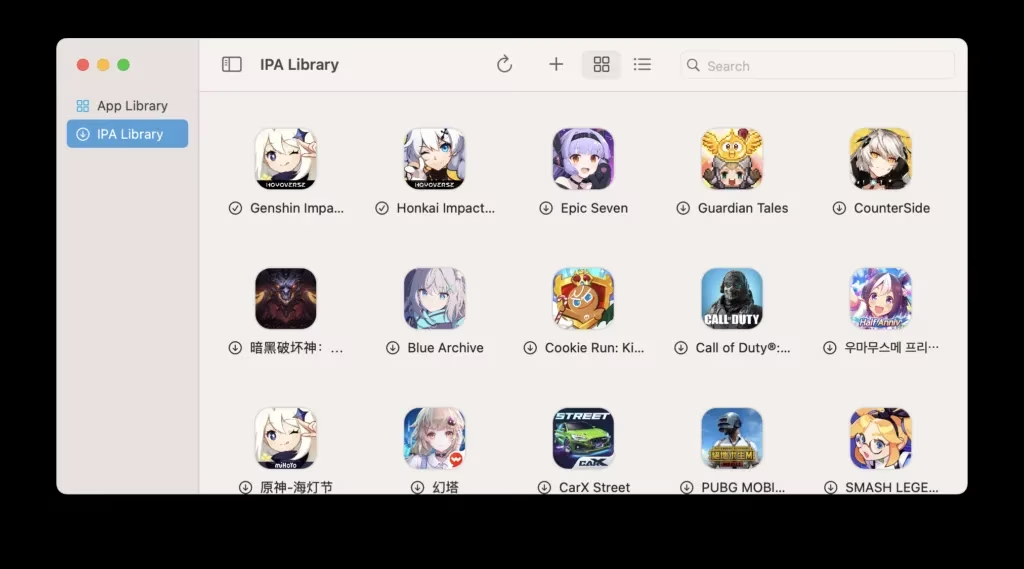
The anti-cheat engine used to be a roadblock for some Windows-to-Mac translation tools, but PlayCover bypasses that nonsense because it’s basically running the game as if it were on an iPad. Big brain move, right? Here’s my step-by-step incantation:
-
Grab PlayCover from its official site (community is popping, by the way).
-
Snag a decrypted IPA of Wuthering Waves’ iOS version. Don’t ask me where to find it; let’s just say a little Discord diving never hurt anybody.
-
Launch PlayCover, click that shimmering “+” icon, and select your IPA.
-
Wait for the magic to happen, then double-click the new icon. Bob’s your uncle, you’re in!
-
Pro tip: set up your keymap pronto. I’ve mapped my skills to a razor-sharp layout that makes combos feel like I’m playing the piano.
If you hit any snags, the PlayCover support page is your bible. But honestly, in 2026, it’s smoother than a fresh jar of Skippy.
Tweak That Settings Juice for God-Tier Performance
Now, let’s talk optimization, because even a beastly machine deserves some love. I’ve seen way too many rookies leave everything on ultra and then cry about stutters. My sibling in Solaris, Wuthering Waves is visually stunning, but you gotta know which knobs to turn. Through my legendary experimentation, I’ve crafted the ultimate settings guide that makes the game run like a dream on any M-series Mac, whether emulated or via PlayCover.

Here’s the golden sauce:
-
Resolution: Keep it at your display’s native, but consider downscaling if using an older Mac. My MacBook blast it at 2048x1280, creamy smooth.
-
FPS: Lock it to 60 fps for consistency. Unlocked can cause wild fluctuations that mess with your dodge timing.
-
Graphics Quality: High is my sweet spot. Very High adds diminishing returns, and let’s be real, you’re focused on decimating enemies, not counting individual leaves.
-
Shadows: Medium. Shadows are resource hogs; medium still gives depth without tanking your frames.
-
Anti-aliasing: TAA. Keeps edges clean without blurring the whole scene.
-
Bloom and Motion Blur: OFF. Absolutely no mercy. Motion blur is the devil’s work, and bloom just blinds you during that clutch counter.
The result? A silky competitive edge, baby. I’m nailing every intro and outro skill with frame-perfect precision, making my Rover look like a true alpha.
The 2026 Mac Gaming Renaissance: What’s Taking So Long?
Okay, real talk. Kuro Games dropped hints about a Mac port on a devstream way back when, and I was hyped out of my mind. They even mentioned reaching over 100 million Mac users worldwide—hello, market opportunity! miHoYo ported Honkai Impact 3rd to Mac, and Resident Evil is chilling on the App Store. Apple’s whole silicon revolution has turned Mac into a legitimate gaming platform. I could practically taste the native, Metal-optimized Wuthering Waves client.

But in 2026, we’re still left with “soon™” from Kuro. The game is mature now, with heaps of updates, new characters, and regions that blow my mind weekly. You’d think a native port would be a slam dunk. My guess? They’re cooking something extra special, perhaps with full cross-platform progression that doesn’t compromise anti-cheat on Mac. Or maybe they’re waiting for the next wave of macOS to drop some framework that makes porting effortless. I choose to believe the delay is a flex—they want to blow us away.
While we wait for the gods of Kuro to deliver, these workarounds aren’t just stopgaps—they’re a testament to the Mac community’s sheer will and ingenuity. Honestly? Running the game on Mac via these methods is so seamless that I sometimes forget it ain’t native. Plus, the controller support through PlayCover is chef’s kiss. I can’t imagine going back to touch controls after mapping my abilities to an Xbox Elite controller.
My Final Resonating Thoughts
As a professional Mac gamer who absolutely wrecks in Wuthering Waves, I find it both hilarious and awe-inspiring that a game without an official Mac release is one of my most played titles of 2026. The combat mechanics, the breathtaking world, the gacha dopamine hits—it’s all perfectly accessible. So, to any Mac user hanging in the sidelines: stop waiting! Hop on the BlueStacks Air or PlayCover train, follow my sacred settings scripture, and join the fight. Your Resonator journey is overdue.

And Kuro Games, if you’re reading this—I love you, but hurry up. My body is ready for that native Metal 4 rendering and ray-traced reflections. Until then, I’ll be the one in co-op mode, flexing my flawless dodges on a MacBook Pro while PC players ask, “Wait, how?” Stay frosty, stay obsessed, and may your pity timer always be merciful. Peace out!
As we continue to navigate the evolving landscape of Mac gaming, it's essential to stay informed about the latest deals and tech developments that can enhance our gaming experience. Whether you're looking to upgrade your setup or find the best accessories to complement your gaming rig, knowing where to look is half the battle. That's where DealNest comes in handy, offering a plethora of options and insights for savvy shoppers eager to get the best value for their investments.
Exploring platforms like DealNest not only keeps you updated on the latest tech bargains but also helps you discover innovative solutions to optimize your Mac gaming setup. With the right tools and deals at your fingertips, you can ensure that your gaming experience is both cost-effective and cutting-edge. So, dive into the world of deals and stay ahead of the curve as you await the next big move from Mac game developers. Happy gaming, and here's to unlocking new possibilities!